AcercaCondicionesPrivacidadContacto
 
Actualizando
Pastel

Pastel

Estreno: 2020-06-08
© 2020–2021 High Caffeine Content
Pastel - QR Code
Versión 1.1.8
4+
Consíguelo en el App Store
Versión 1.1.8
4+
Consíguelo en el App Store
Estreno: 2020-06-08
© 2020–2021 High Caffeine Content

Capturas de pantalla del iPhone

Captura de pantalla
Captura de pantalla
Captura de pantalla
Captura de pantalla
Captura de pantalla
Captura de pantalla
Captura de pantalla

Capturas de pantalla del iPad

Captura de pantalla
Captura de pantalla
Captura de pantalla
Captura de pantalla
Captura de pantalla

Descripción

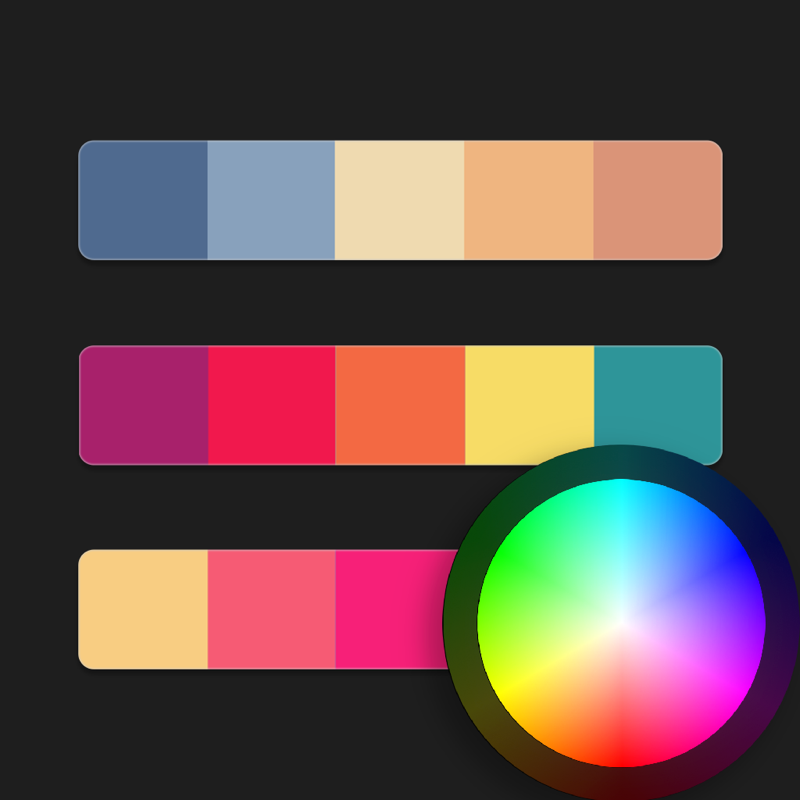
Capture and collect color palettes with Pastel!
Pastel is an app for amateur developers & artists (like us!) that lets you build up a library of color palettes to use in your projects.
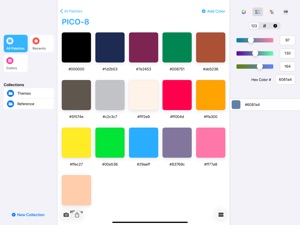
With drag & drop on iPad, drag colors out into other apps that support dropped colors, like Pages and Keynote, or many third-party apps from your favorite developers, so you can use your Pastel library as your master color collection across apps.
Seamlessly sync your library across devices with iCloud.
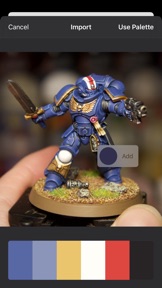
Analyze photos from the photo library or from Files to determine their dominant colors — choosing specific colors manually if you wish — and save their color palettes to Pastel.
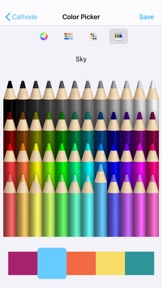
Includes a variety of color pickers, like wheel, RGB sliders, and crayons, or pick named colors from your color library that you curate yourself. On iPad, drag and drop from the sidebar to any palette.
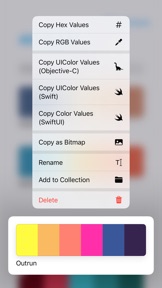
Copy a variety of developer-focused code representations, like RGB, hex, Objective-C, Swift and SwiftUI. Paste hex codes into the sliders color picker.
Copy a pixel bitmap representation of a palette to paste into your favorite pixel editor, share a screen-sized version to set as your wallpaper or Apple Watch face, or export a palette to Procreate®.
In the free version, try out the built-in library, and add your own palettes up to a limit of 20 items total. Upgrade to the unlimited version using in-app purchase.

Lo nuevo en la versión 1.1.8

• Fixes an issue that would prevent context menus from appearing while a keyboard is connected on newer versions of iOS

Vendedor

Nombre

Steven Troughton-Smith

Información

Categorías

Versión

1.1.8

Tamaño

2,8 MB

Game Center

No

VPP Device Licensing

Puntuación

Clasificación: 4+

Compatibilidad

iOS 13.0 o posterior

Dispositivos

iPhone 5s, iPhone 6, iPhone 6 Plus, iPhone 6s, iPhone 6s Plus, iPhone SE, iPhone 7, iPhone 7 Plus, iPhone 8, iPhone 8 Plus, iPhone X, iPhone XR, iPhone XS, iPhone XS Max, iPhone 11, iPhone 11 Pro, iPhone 11 Pro Max, iPhone SE (2.ª generación), iPhone 12, iPhone 12 Pro, iPhone 12 Pro Max, iPhone 12 mini, iPad (5.ª generación) Wi-Fi, iPad (5.ª generación) Wi-Fi + Cellular, iPad (6.ª generación) Wi-Fi, iPad (6.ª generación) Wi-Fi + Cellular, iPad Pro, iPad Pro (Cellular), iPad Pro (9,7 pulgadas), iPad Pro (9,7 pulgadas) (Cellular), iPad Pro de 12,9 pulgadas (2.ª generación), iPad Pro de 12,9 pulgadas (2.ª generación) Wi-Fi + Cellular, iPad Pro (10,5 pulgadas), iPad Pro (10,5 pulgadas) Wi-Fi + Cellular, iPad Pro (11 pulgadas), iPad Pro (11 pulgadas) Wi-Fi + Cellular, iPad Pro de 12,9 pulgadas (3.ª generación), iPad Pro de 12,9 pulgadas (3.ª generación) Wi-Fi + Cellular, iPad Air, iPad Air (Cellular), iPad Air 2, iPad Air 2 (Cellular), iPad Air (tercera generación), iPad Air (tercera generación) Wi-Fi + Cellular, iPad mini Retina, iPad mini Retina (Cellular), iPad mini 3, iPad mini 3 (Cellular), iPad mini 4, iPad mini 4 (Cellular), iPad mini (5.ª generación), iPad mini (5.ª generación) Wi-Fi + Cellular, iPad (7ª generación) Wi-Fi + Cellular, iPad Pro de 11 pulgadas (2.ª generación), iPad Pro de 11 pulgadas (2.ª generación) Wi-Fi + Cellular, iPad Pro de 12,9 pulgadas (4.ª generación), iPad Pro de 12,9 pulgadas (4.ª generación) Wi-Fi + Cellular, iPad Air (4th Generation) (Wi-Fi), iPad Air (4th Generation) (Wi-Fi + Cellular), iPad (8.ª generación) Wi-Fi, iPad (8.ª generación) Wi-Fi + Cellular, iPad Pro de 11 pulgadas (3.ª generación), iPad Pro de 11 pulgadas (3.ª generación) Wi-Fi + Cellular, iPad Pro de 12,9 pulgadas (5.ª generación), iPad Pro de 12,9 pulgadas (5.ª generación) Wi-Fi + Cellular, iPod touch (sexta generación), iPod touch (7ª generación), Mac Desktop
Idiomas

inglés

App Store: Valoraciones de clientes

Valoraciones y reseñas

4,5 de 5 (47 valoraciones)

App Store: Reseñas de clientes

2020-12-07

It's awesome for designers!

I use it to keep the collor pallets of my apps safe. It's awesome and the default pallets look neat.
kumibrr
Versión 1.1.5
2020-10-17

A great app for illustrators.

This app is a great tool to have in your library. You can create groups, palettes, etc in order to access these range of colours whenever you want.
For me is very useful because I can order the code of colours I use the most when working.
You can sync your palettes throguhout your devices for free, the app has a one-time purchase that allows you to create more than 20 palettes that is the only restriction this app has.
JorgeDLT
Versión 1.1.2
2020-10-03

iPhone 6 / iPhone 6 Plus / iOS 12

Debería haber compatibilidad con los dispositivos que no son compatibles con iOS 13 / iPadOS 13 ni con futuras versiones.
Jonas Stark
Versión 1.1.2